Simply put, how do I reveal the entire map at the start of the game, so there's no fog?
I'm using SCMdraft.
Also, is there a way to make custom triggers? I've seen triggers talked about before that I don't have in my list.
Thanks.
None.
you can remove the "black" fog of war in the fog of war layer but there will still be the greyish transparent fog of war. If you want to remove all fog of war place map revealers all over the map for whichever player you want.

Im not sure about custom triggers, but you'd probably have to mod to do that.
None.
There aren't any non-modded custom triggers, of course, with EUDs you have some possible conditions that aren't normally accessable, but any actions cannot be custom.
None.

Just here for the activity... well not really


If you want total vision everywhere, then

Ah, ninja'd.
guy lifting weight (animated smiley):
O-IC
OI-C
"Oh, I see it"
Thanks a lot guys, that's just what I needed.
One more thing, how exactly do I change the color/size of the message text? I assume it's some code, but what are the formats?
None.
You can't change the size, but here's the codes in SCM Draft for colors:
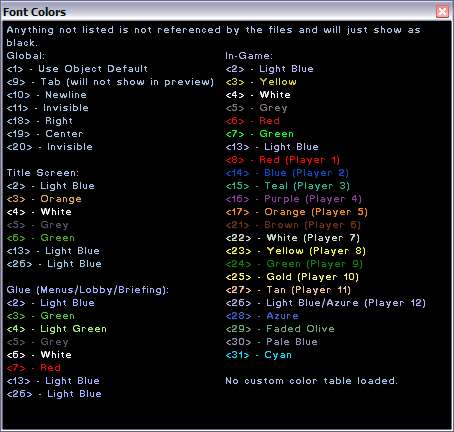
Note that you have to use different codes based on where you're trying to change the colors.
None.
Thanks again, appreciate it.
None.
What a nice-looking program with colors hints, Falk! Where can I get it?
Some.




 NudeRaider -- I bet it just needs another training session against pros instead of only against itself and nobody will be able to stop it anymore.