
Staredit Network > Forums > SC2 Assistance > Topic: Zoomed Camera, resolution & camera boundaries
Zoomed Camera, resolution & camera boundaries
Mar 18 2012, 12:18 am
By: Ahli  

Mar 18 2012, 12:18 am Ahli Post #1

I do stuff and thingies... Try widening and reducing the number of small nooks and crannies to correct the problem.

Please have a look at these 2 pictures:


^ 1024x768


^ 1920x1080

Both resolutions display the same scene... at least they should...
But in reality, the widescreen resolution doesn't show enough of the map as it hits the camera boundary to early for my chosen zoom.

Small clarification: in both pictures the screen is obviously centered on the hero...

My settings (modified default camera)
Code
CCamera_BorderSizeX     0
CCamera_BorderSizeY     0
CCamera_TargetSmooth_SmoothTimeMax     0.100000
CCamera_TargetSmooth_SmoothTimeMin     0.100000
CCamera_TargetSmooth_VelocityMax     222222224.000000
CCamera_ZoomTable_Param_Value     ((0.000000|0.000000|0.000000|0.000000|21.111111|56.000000|0.000000|0.000000|0.000000|0.000000|0.000000|0.000000|0.000000)|(0.000000|0.000000|0.000000|0.000000|30.000000|52.000000|0.000000|0.000000|0.000000|0.000000|0.000000|0.000000|0.000000)|(0.000000|0.000000|0.000000|0.000000|26.000000|48.000000|0.000000|0.000000|0.000000|0.000000|0.000000|0.000000|0.000000)|(0.000000|0.000000|0.000000|0.000000|22.000000|44.000000|0.000000|0.000000|0.000000|0.000000|0.000000|0.000000|0.000000)|(0.000000|0.000000|0.000000|0.000000|18.000000|40.000000|0.000000|0.000000|0.000000|0.000000|0.000000|0.000000|0.000000))

Basically I set the distance from 34 to 21.111111.

Is there a way that makes the screen with 16:9 to be able to scroll far enough to see the same area as the 4:3 ration?
Can I adjust how much space the camera takes up or do I need to adjust all camera boundaries and shift everything in my map more far away of the edges of the map?

Or is the camera just that limited?
If yes, that's something Blizzard could improve, too...

Post has been edited 1 time(s), last time on Mar 18 2012, 2:36 am by Ahli. Reason: added clarification



Mar 18 2012, 12:30 am Roy Post #2

An artist's depiction of an Extended Unit Death

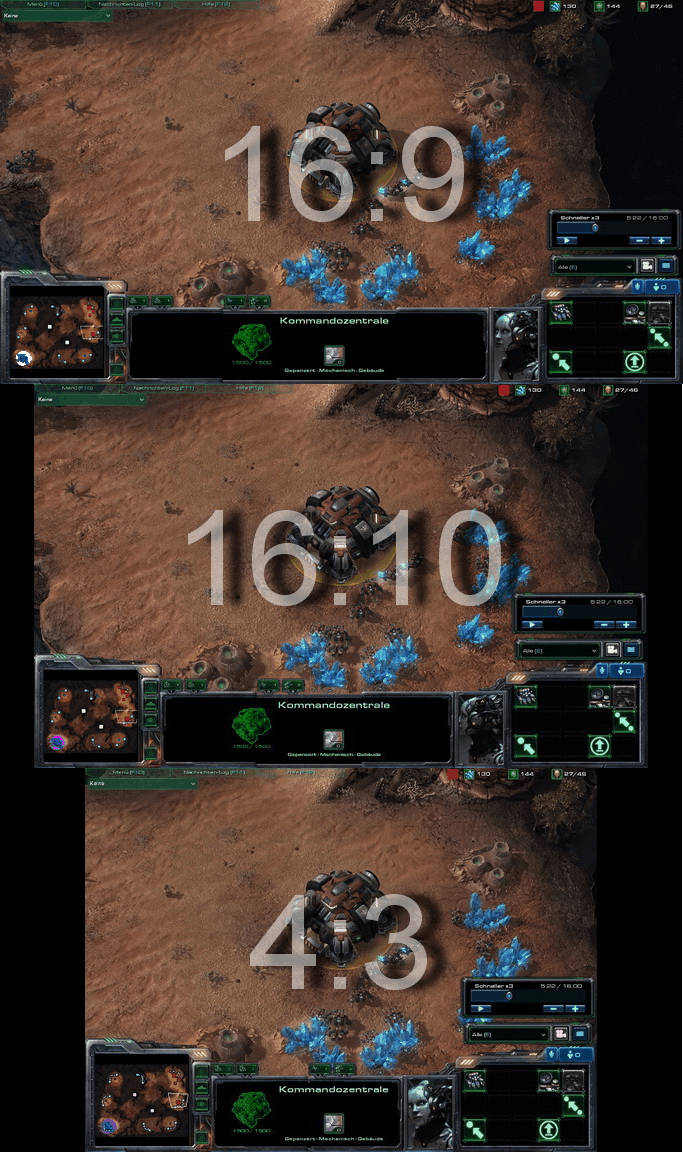
No, different ratios are going to see more or less of a scene.

Here's how ratios work in SC2:


As you can tell, if you try to zoom in the 16:9 to see the same horizontal as the 4:3, it will have a significantly poorer vertical view.

A possible remedy (albeit a bad one) is to always assume a 4:3 ratio, and just have black fog/unimportant terrain covering the side edges for 16:9 and 16:10 viewers.


Mar 18 2012, 1:01 am Ahli Post #3

I do stuff and thingies... Try widening and reducing the number of small nooks and crannies to correct the problem.

Quote from Roy
No, different ratios are going to see more or less of a scene.
I know that. That applies to an unmodified cameras.

In my camera I zoomed in because people complained about how far away they are from the hero. So I reduced the distance.
Now if come close to edge of a camera boundary the widescreen is f*cked because it doesn't show everything. 4:3 ratio however does.


Mar 18 2012, 2:17 am Jack Post #4

>be faceless void >mfw I have no face

Ah now I see, widescreen doesn't show the two guys sitting there. Hmmmm. I can't think off the top of my head a way to fix this, I'd say it's something Blizzard could fix.


Red classic.

"In short, their absurdities are so extreme that it is painful even to quote them."

Mar 23 2012, 6:18 pm Ahli Post #5

I do stuff and thingies... Try widening and reducing the number of small nooks and crannies to correct the problem.

"Fixed" my problem with height changes of the hero (+10), the actor (-10) and the camera (-10) instead of adjusting the distance.

It's not a perfect solution, but it works in my case.


Options
  Back to forum
Please log in to reply to this topic or to report it.
Members in this topic: None.
[10:41 am]
ManCubuS -- Seems like something's broken regarding the site then. Sadge...
[07:36 am]
Oh_Man -- have i ever told u guys my SC2 pro-gamer story
[11:30 pm]
Ultraviolet -- That's strange, it looks like you targeted the base image file (sometimes people make the mistake of just using the imgur page link which doesn't work for embedding) but it still didn't work it sounds like.
[2026-7-26. : 3:34 pm]
ManCubuS -- Used : " [img=https://i.imgur.com/gpOjTuD.jpeg] "
[2026-7-26. : 3:28 pm]
ManCubuS -- Even tried with imgur, doesn't attach.
[2026-7-26. : 3:14 pm]
ManCubuS -- I should try a workaround, thanks! Sadly imgur is blocked in my country for some unknown reason.
[2026-7-26. : 3:05 pm]
NudeRaider -- I think SEN has trouble with https or hotlinking is forbidden. It certainly is nothing about the size, it just fails to get any size. You can get it working if you use imgur and include the actual image link for the img tag. Like this: [img=https://i.imgur.com/ddYqXZa.jpeg]
[2026-7-26. : 11:15 am]
ManCubuS -- Hey fellas! Anyone knows why when I try to upload an image it says "failed to get image size"? I even tried making it so small. Imgur isn't working here and I tried postimg no luck.
[2026-7-23. : 6:40 am]
Oh_Man -- true
[2026-7-23. : 3:16 am]
RIVE -- Still annoyed there was never a trigger to stop or pause wavs.
Please log in to shout.


Members Online: Zycorax, Dem0n